
Paste a link
What their code contains
Section titled “What their code contains”There’s no code here: you have a link instead. It can be a profile link from any app on these pages, such as linkedin.com/in/olena-k or t.me/olena_k, a met.cards card link, or a contact card copied as text. Tracking text at the end of a link is removed.
Ask them to show it
Section titled “Ask them to show it”Ask them to copy their profile link from the app (most apps have Share profile or Copy link on the profile), and send it to you. Or copy it from their profile in your browser.
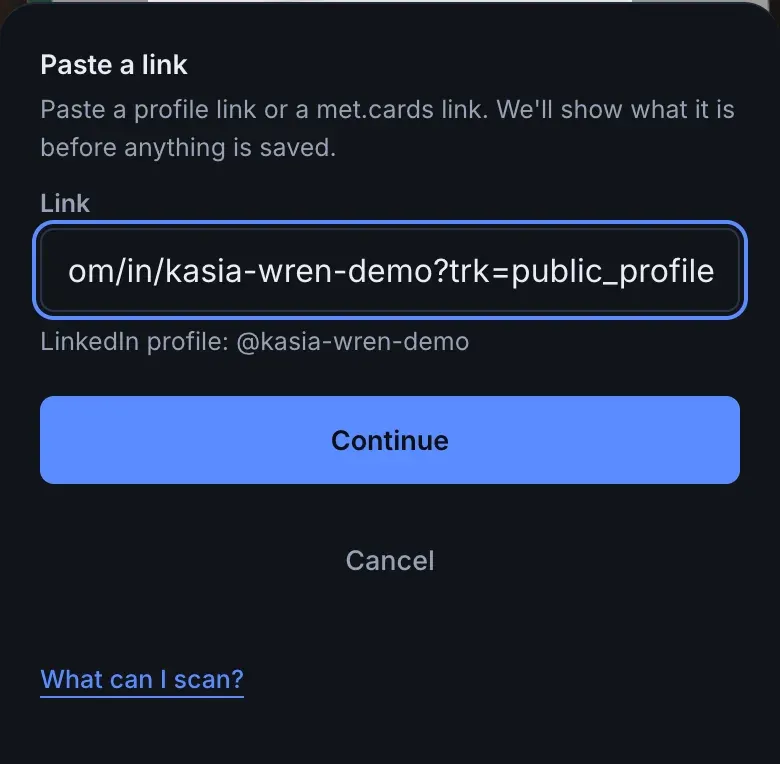
On Capture, choose QR and select Paste a link. Paste it into Link and select Continue.
Last checked: not yet on a phone. These steps follow the app’s own help and may differ in their version.
What met.cards saves
Section titled “What met.cards saves”Before you save, a line under the field shows what met.cards found, for example LinkedIn profile: @olena-k, so you can catch a wrong paste. Select Continue, and the same screen a scan opens asks for anything else it needs, usually their name.
- What it saves is the same as for a scan of that app’s code. See that app’s page in Scan other apps.
- A pasted contact card is shown before it’s saved, even when it has a name.
- The connection is marked as a pasted link rather than a QR scan.
If met.cards doesn’t recognise the link, the line says “Not a link we recognise. You can still save it as a note.” After Continue, the sheet says This isn’t a link we recognise: type their name and select Save as note, or select Paste again.
Name and photo
Section titled “Name and photo”The same as for the app the link comes from. See that app’s page.
Troubleshooting
Section titled “Troubleshooting”- The line says it’s not a link we recognise. Check that you copied their profile and not a post, a company page or a search result. Paste the full link, starting with
https://. - The link is a short link, such as
lnkd.in,t.coorvm.tiktok.com. Only the app can tell whose it is, so met.cards saves it as a link only and you type their name. - You already have them. As after a scan, met.cards suggests people you already have whose name matches as you type theirs, and you can add the profile to the right one. See When you already have them.