
WhatsApp QR codes
What their code contains
Section titled “What their code contains”WhatsApp has two kinds of code.
- Their own contact code, from WhatsApp’s settings. It holds
wa.me/qr/and a code that only WhatsApp can turn into a person. It hides their name and number. So it gives met.cards a link only: a link that opens them in WhatsApp. - A click-to-chat code, which businesses print on cards and signs. It holds
wa.me/and a phone number. met.cards saves the number as their WhatsApp profile, a profile link, and as their phone number.
Ask them to show it
Section titled “Ask them to show it”On an iPhone:
- Open WhatsApp and tap Settings.
- Tap the QR code icon next to their name.
- Make sure My code is open.
On an Android phone:
- Open WhatsApp and tap More options (⋮), then Settings.
- Tap the QR code icon next to their name.
- Make sure My code is open.
Apps move these screens between versions. If the steps don’t match their app, look for a QR code icon on their profile or in their settings. Scan it from Capture in QR mode.
Last checked: not yet on a phone. These steps follow the app’s own help and may differ in their version.
What met.cards saves
Section titled “What met.cards saves”For a contact code, met.cards shows WhatsApp contact and explains: “WhatsApp keeps the contact inside its own app, so we can’t read the name or number from this code. We’ll save a link that opens them in WhatsApp.” Then choose:
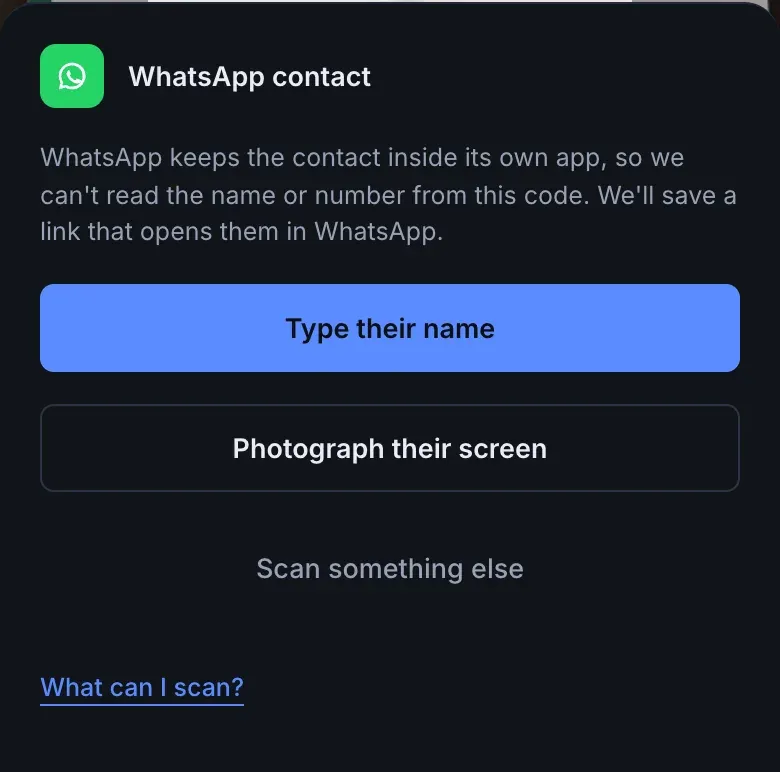
- Type their name, to save the link with a name you type.
- Photograph their screen, to read the name from their phone. Ask them to open their WhatsApp profile first, so their name is on the screen. met.cards reads the photo the way it reads a paper card, and keeps the WhatsApp link.
Either way, the person’s page shows WhatsApp under Profiles, with Open in WhatsApp. An info icon next to it says “Contact code: opens in WhatsApp, the name was added by you.”
For a click-to-chat code, met.cards shows the number and asks for a name: “WhatsApp codes share a profile, not a name. Add their name so you can find them later.” It saves the number as their WhatsApp profile and their phone number.
Name and photo
Section titled “Name and photo”WhatsApp keeps the contact inside its own app, so met.cards can’t fill in the name or photo, and no setting changes that.
Troubleshooting
Section titled “Troubleshooting”- The saved link no longer opens them. They may have reset their QR code in WhatsApp, which makes old codes stop working. Ask for their number and add it with Edit.
- The link opens WhatsApp and asks whether to add them. That’s expected. Only WhatsApp can add a WhatsApp contact.
- Nothing happens. Ask them to turn their screen brightness up, and tilt your phone so their screen doesn’t reflect the lights. Or take a photo of the code and pick it with the gallery button in QR mode.
- You already have them. As you type their name, for either kind of code, met.cards suggests people you already have whose name matches what you typed, under Already in your connections? Select Add to on the right person, for example Add to Olena Koval, to add WhatsApp to them. A click-to-chat code also holds a phone number, so if you already have that number, met.cards tells you when you select Save. See When you already have them.